Do you want to sell tickets to a live stream? We can help. Live streaming has opened up events to audiences who can’t make it in person, whether that’s a concert, a conference, or a special one-night-only show. Ticketscene makes it easy to sell tickets to a live stream event and deliver the stream link directly to your patrons, but it’s worth knowing upfront that Ticketscene does not host the actual live stream (nor do any other event ticketing platform). You’ll need to pair your event with a third-party streaming platform. Here’s how it all comes together.
Where Do I Actually Host My Live Stream?
As mentioned, first things first, you’ll need to choose a third-party platform to broadcast your event. There are a lot of options out there. Here are a few popular ones to get you started:
- Vimeo: best for polished, professional broadcasts where you want strong privacy controls, like concerts, theatre performances, or corporate events.
- YouTube Live: best for free, easy setup with wide reach, using an unlisted link that’s shared only with ticket buyers.
- Zoom: best for interactive events like workshops, conferences, panels, or meet-and-greets where you want two-way audio and video.
- Twitch: best for gaming events, esports tournaments, or live music sessions with an interactive chat-driven audience.
- StreamYard: best for panel discussions or interviews where you want to broadcast to multiple platforms at once.
These are just a handful of the live streaming platforms available. There are plenty of other options out there, such as Facebook Live, LinkedIn Live, and dedicated streaming services like Dacast or Restream, so it’s worth exploring what fits your event and budget best.
How to Add Your Live Stream Link to Your Event
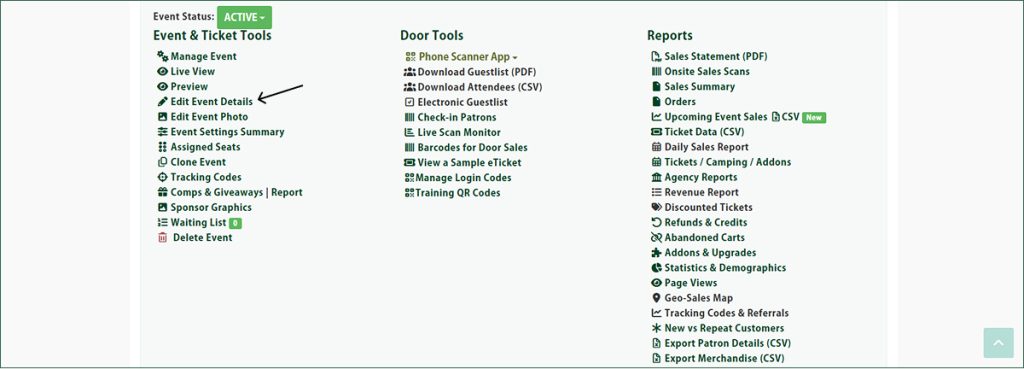
Once you’ve picked a platform, go to your event management page and select Edit Event Details. *You can also do this when you Add an Event the first time.
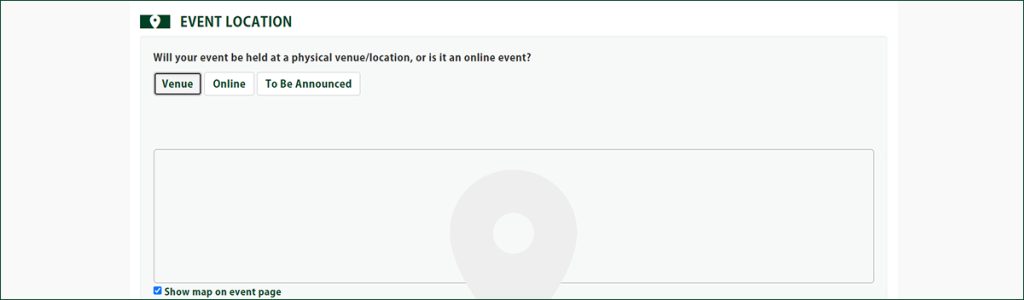
In the Event Location section, select Online.
This will open a field for your Event Link/Stream URL, along with an optional password field if you’d like to add one.
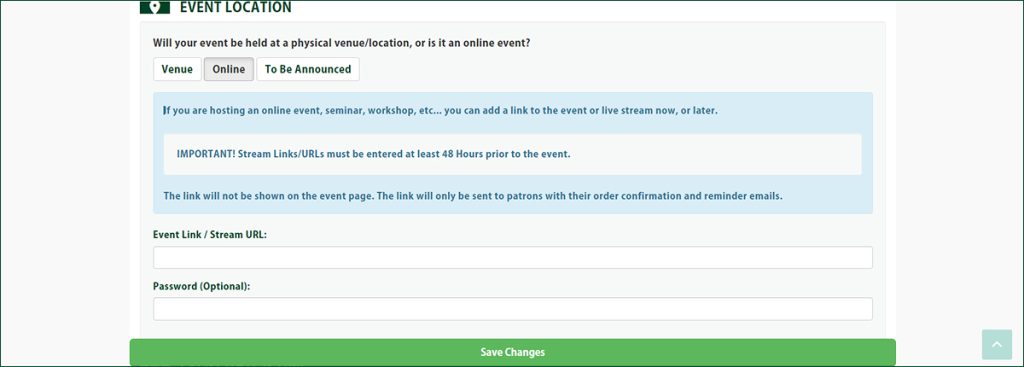
A few important things to keep in mind: your stream link must be entered at least 48 hours before your event starts, and the link is never shown publicly on your event page. It’s only sent to ticket buyers through their order confirmation and reminder emails, so you can add it now or update it closer to the event date.
How to Protect Your Live Stream Link From Unauthorized Use
It’s a fair question. Once a link goes out in an email, what’s stopping someone from sharing it with people who didn’t buy a ticket?
You do have the option to password-protect your ticket sales on Ticketscene, which adds a layer of protection before someone can even purchase a ticket.
But the real answer is that the strongest protection happens on the streaming platform’s end, not the ticketing side. Most streaming platforms give you tools to moderate who actually enters your stream, separate from who has the link. This might look like:
- Requiring registration on the streaming platform and manually approving attendees against your guest list.
- Using a waiting room feature and admitting patrons one by one, matching names or ticket numbers to your list.
- Setting the stream to private or unlisted so it can’t be found or shared outside of the direct link.
- Monitoring active viewers during the stream and removing anyone who isn’t on your guest list.
In short, think of the ticket purchase as the first checkpoint and the streaming platform as the door. Deciding who’s actually let in on the day of the event is what keeps your live stream secure.
Have Questions About Setting Up Your Live Stream Event?
If you need a hand adding your stream link, setting a password, or figuring out the best way to sell tickets to your live stream event, reach out to the Ticketscene team at info@ticketscene.ca and we will be happy to help.