The moment someone buys a ticket to your event, they receive an email confirming their order, along with their eTicket. That email is prime real estate. It’s guaranteed to be opened, it’s saved for reference, and it’s often the last thing your patron sees before showing up on event day. Ticketscene gives you three ways to make the most of it: adding sponsor information to your e-Ticket, an Order Confirmation message and eTicket Instructions. Here’s how each one works and what to put in them.
Customizing Your e-Ticket
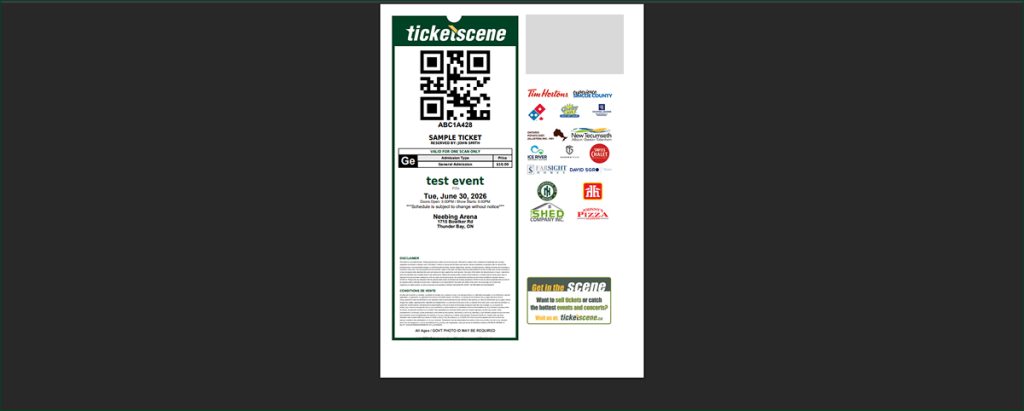
To customize the e-ticket itself, such as to add sponsor graphics, we refer you to this article and this article.
Personalizing the Order Confirmation Message
From your event management page, go to Edit Event Details and scroll to the Order Confirmation section.
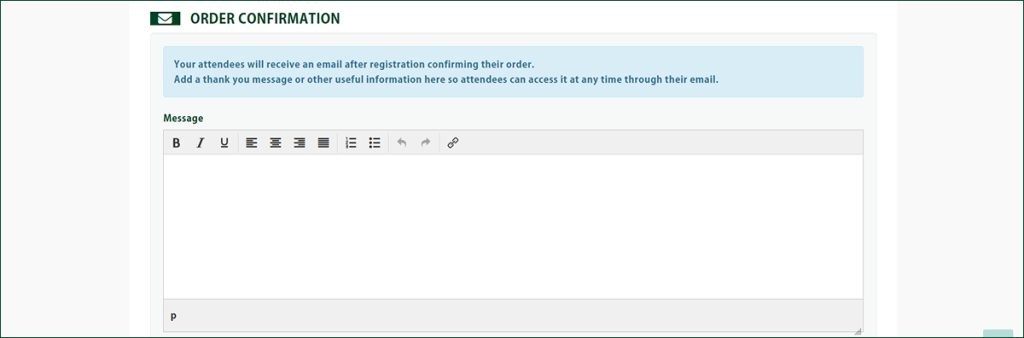
Your attendees will receive an email after registration confirming their order, and this is where you can add a personalized message, or any other useful information, so it’s available to them at any time through their email.
The message box gives you basic formatting tools, including bold, italics, underline, alignment, and lists, along with the ability to add a link. A few ideas for what to include:
- A genuine thank you message for supporting your event
- Sponsor mentions or shout-outs
- Parking information or directions to your venue
- Details on what to bring, such as ID or a printed ticket
- A link to your event’s social media pages or hashtag
- Any last-minute updates you want attendees to see before the event
Adding eTicket Instructions to Your Patrons’ Tickets
When a ticket buyer purchases a ticket, they’re sent an eTicket by email.
eTicket Instructions is a field where you can add special instructions that are displayed directly on that eTicket, so the information travels with the ticket itself rather than getting buried in the confirmation email.

This field works best for short, practical instructions your patron needs on the day of the event.
If you’d also like to feature sponsor graphics on your ticket, as mentioned, you can set that here.
Order Confirmation vs. eTicket Instructions
It’s easy to mix these two up, so here’s the simplest way to think about it.
The Order Confirmation message is the bigger, more personal note in the body of the confirmation email, better suited for a thank you, sponsor mentions, or general information.
eTicket Instructions are short, practical details displayed right on the ticket itself, best used for things like gate numbers or arrival times that your patron needs to have handy on event day.
Have Questions About Personalizing Your E-Ticket Email?
If you need a hand writing your order confirmation message, adding eTicket instructions, or featuring sponsor graphics on your ticket, reach out to the Ticketscene team at info@ticketscene.ca and we will be happy to help.