Keeping your event info accurate and up-to-date is important for your attendees and ticketing. Ticketscene makes it easy to edit most of your event details at any time, right from your dashboard. However, once tickets have been sold, certain changes require you to contact our team directly. Here is everything you need to know about updating your event details.
How to Change Your Event Details
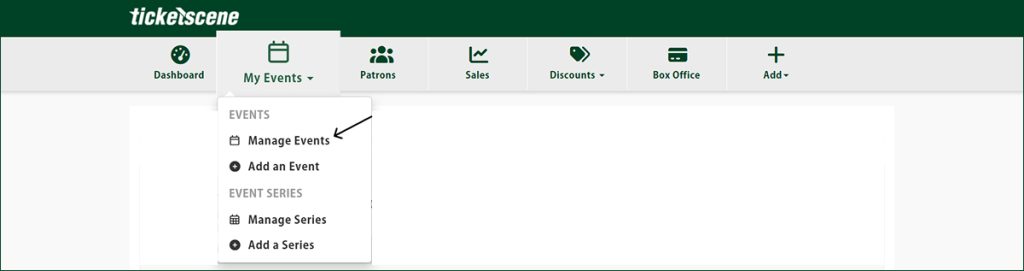
To get to your event details, move your mouse over My Events and go to Manage Events from the menu.
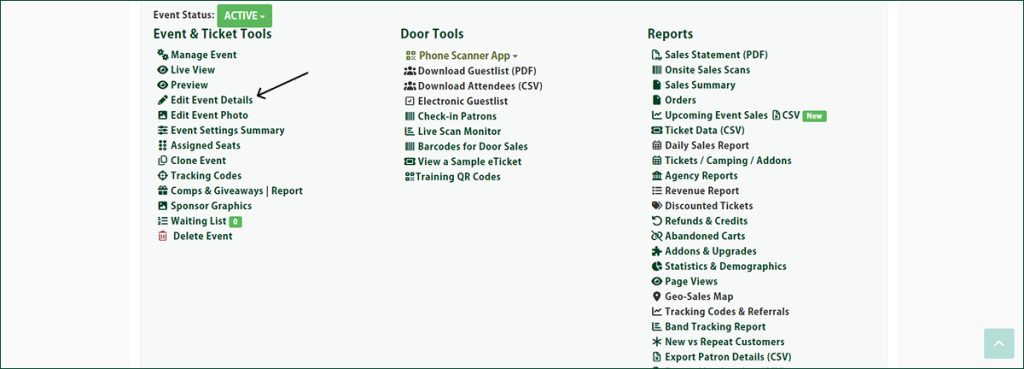
Once you are in the event management area, click the name of the event you want to edit. Then, click Edit Event Details to make your changes.
“I Can’t Seem to Edit Certain Event Details After Tickets Have Been Sold”
Once at least one ticket has been sold for your event, some changes can no longer be made directly through the dashboard.
For any updates to the venue, headlining acts, or date and time of the event, you will need to contact the Ticketscene team directly by emailing info@ticketscene.ca.
This is because changes to your venue, date, time, or headlining acts can be grounds for refund requests from attendees. Before reaching out to request one of these changes, please make sure the update is genuinely necessary for your event.
We will work with you to process the change and will advise on next steps if refunds may be involved.
Have Questions About Your Event Details?
If you are unsure whether a change requires contacting us, or if you run into any issues editing your event, reach out to the Ticketscene team at info@ticketscene.ca and we will be happy to help.