Your event image or event poster is one of the first things people notice when they land on your event page, so it’s worth taking a few extra minutes to get it right. Ticketscene gives you a few different ways to add images to your event, whether you just need a single poster, want a scrolling banner with multiple photos, or are uploading your image for the very first time while setting up your event.
The Importance of Uploading a Photo For Your Event
If you’re setting up a brand new event, it’s important to upload an image that will be used as your event poster.
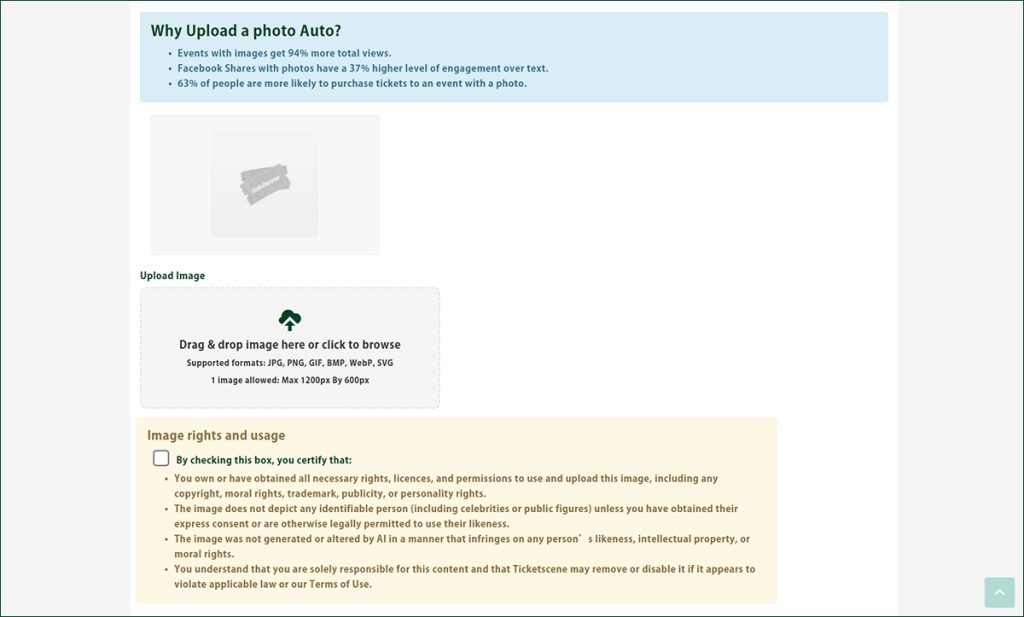
To do this, simply drag and drop your image into the “Upload Image” box. The image must be no larger than 1200px by 600px, and you’ll need to check the box certifying that you either own the image or have obtained the rights to share it on your event listing.
Without this step, your event won’t have an image at all, so don’t skip it!
You can always come back later and swap in a new photo using the Edit Event Photo tool.
How Do I Upload an Image for My Event?
From the event management page, under Event & Ticket Tools, click Edit Event Photo.
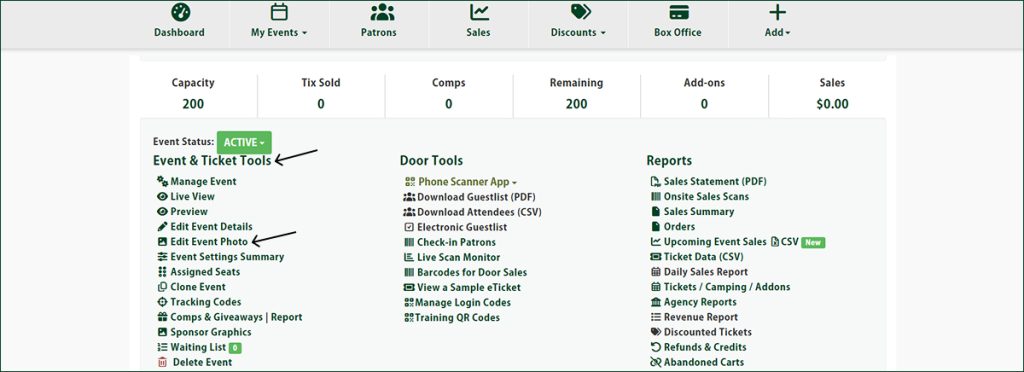
From there, select the image you would like to upload. Please ensure the file is less than 2MB, in either .jpg or .jpeg, and is ideally sized for 850px wide. by 425px high.
Then click the Upload Photo button. You’re done! Your new event photo will appear on your event page right away.
How Do I Use Multiple Images to Have a Scrolling Banner for My Event?
Want to show off more than one image for your event? You can!
You can set up a scrolling banner that rotates through a series of images instead of displaying just one. A maximum of 10 images, each 1150 pixels wide by 400 pixels high, can be used for your scrolling banner.
If you’d like help setting up your scrolling banner, please contact info@ticketscene.ca for the next steps.
Have Questions About Your Event Poster?
If you need a hand getting your event poster or banner images set up, or you have questions about sizing or file formats, reach out to the Ticketscene team at info@ticketscene.ca and we will be happy to help.