You may not want your every event to be for the general public. Whether you are running an invite-only gathering, a members-only event, or simply want to control who can access your ticket sales, Ticketscene gives you a few different ways to limit who can find and purchase tickets to your event. Here is a breakdown of your options.
Password Protecting Your Event
Passwords can be used in two different ways depending on how much access you want to restrict.
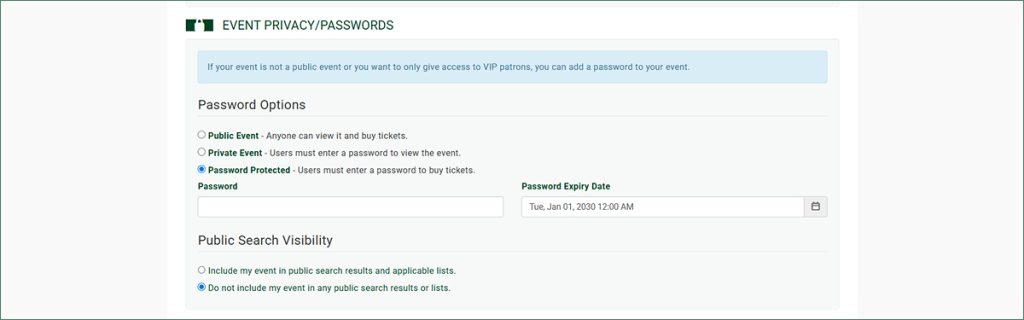
Both options are found in the same place: on the event edit page, scroll down to the Event Privacy/Password section.
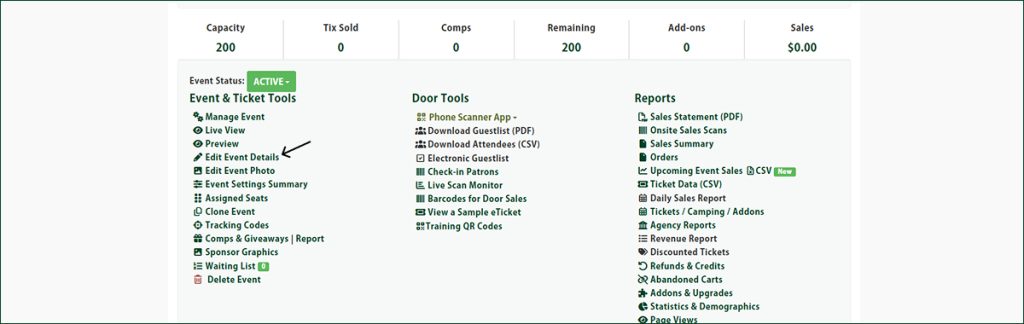
Option 1: Hide All Event Details
Select the Private Event option to prevent users from seeing any event details at all. Visitors who come across your event will not be able to view the description, ticket types, pricing, or any other information without the password.
Option 2: Block Ticket Purchases Only
Select the Password Protected option if you want the event details to be visible, but ticket purchases to require a password. This is useful when you want people to be able to see that the event exists, but only allow specific buyers to complete a purchase.
Setting Your Password
After selecting either option, enter your password and set an expiry date for it. Keep in mind that the password is case sensitive, so share it with your guests exactly as entered.
Hiding Your Event from Search and Public Lists
If you want your event to be completely private – which means that it’s visible only to people you share the link with directly – Ticketscene can remove it from all public-facing search results and event listings.
On the event edit page, scroll down to the Event Privacy/Password section and select Do not include my event in any public search results or lists.
With this option enabled, your event will not appear anywhere on Ticketscene unless someone has the direct link. It is the ideal setting for truly invite-only events.
Have Questions About Event Privacy Settings?
If you are unsure which option is right for your event or need a hand getting it set up, reach out to the Ticketscene team at info@ticketscene.ca for more info.